
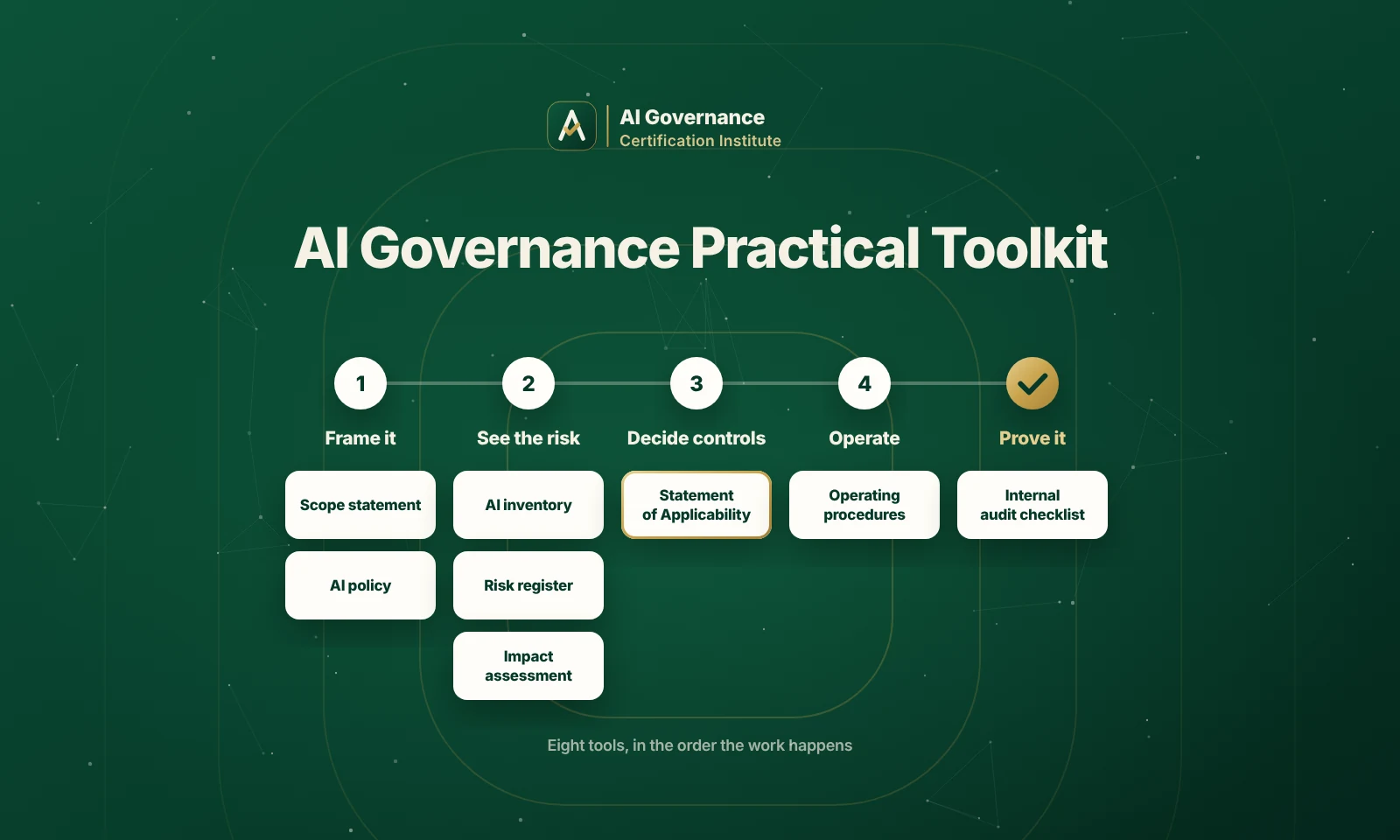
A folder of thirty templates is not a toolkit. It is a pile of files, and a pile of files is where most AI governance projects stall in week two, because nobody knows which document to open first or how any of them connect. A toolkit earns the word practical only when it is organized around the work you actually do.
That is the difference this page is about. Plenty of vendors will sell you a zip of policies and registers; far fewer will tell you which resource belongs at which stage of building an AI management system, how the pieces feed one another, and where a document still needs your judgment. Mapped to ISO/IEC 42001:2023, the AI management system standard, a good kit turns a daunting project into a sequence you can follow.
So this guide from the AI Governance Certification Institute (AIGCI) lays the toolkit out by the job, not the file name. It covers what makes a toolkit practical, the resources you reach for at each stage, a free starter spine you can build today, and the honest question of whether to buy, build, or borrow. It is the working companion to what training includes.
What Makes a Toolkit Practical, and What Makes It a Pile
Before the contents, the test. Three things separate a toolkit you will actually use from a download you will abandon.
• It is mapped. Each resource points to a specific requirement in the standard, so you know why it exists and what done looks like.
• It is connected. The risk register feeds the control decisions, which feed the evidence, so finishing one document sets up the next instead of starting from scratch.
• It is worked, not blank. A realistic example you adapt beats an empty form you have to decode, which is the quiet reason most free packs go unused.
A pile fails all three. It is a set of unrelated forms, unmapped and unexampled, and it leaves you doing the hardest part, the sequencing and the judgment, entirely alone. The rest of this page is organized to pass the test rather than describe it.
The Toolkit, Mapped to the Work
An AI management system is built in a rough order, and a practical toolkit mirrors that order. The table below pairs each stage of the work with the resource you reach for, so the kit reads as a sequence rather than a folder. The underlying documents each have a worked version in the templates library.
|
Stage |
What You Are Doing |
Toolkit Resource |
|
Frame it |
Setting boundaries and direction |
Scope statement and AI policy |
|
See the risk |
Finding and rating what could go wrong |
AI system inventory, risk register, impact assessment |
|
Decide controls |
Choosing what to put in place, and why |
Statement of Applicability and control set |
|
Operate |
Running the controls day to day |
Operating procedures and monitoring plan |
|
Prove it |
Showing the system works |
Internal audit checklist, management review, evidence log |
Two stages carry the most weight. In framing, the AI policy sets the direction every later document inherits. In seeing the risk, the risk register template turns vague worry into owned, rated entries, and an impact assessment forces you to name who is actually affected, which is the question an auditor opens with.
Read top to bottom, the stages also explain why order matters. You cannot decide controls before you have seen the risk, and you cannot prove the system works before the controls are operating. A toolkit that hands you all of it at once, with no sequence, is why projects freeze at the first document.
The Free Starter: Build the Spine First
You do not need the whole kit to start, and you should not wait for it. Five resources form the spine that every later document depends on. Build these first and the rest hang off them:
• A defined AIMS scope, so everyone knows what is in and what is out.
• An AI system inventory, because you cannot govern what you have not listed.
• An AI policy that states your principles and acceptable use.
• A risk register with owners and ratings, not just descriptions.
• An AI system impact assessment for your highest-stakes system.
The inventory is the one people skip and regret, so here is a starter structure you can copy into a spreadsheet today. A risk register then links to it by system, giving every risk a home.
|
AI SYSTEM INVENTORY (starter columns) - System name and owner - Purpose and the decision it supports - Build, buy, or embedded feature - Data used, and whether it includes personal data - Users and affected groups - Approval status: sanctioned or shadow (unsanctioned) - Risk tier (low / medium / high) - Linked risk register and impact assessment - Status and last review date |
That one table does more than it looks. It is the map the whole system is built on, it feeds your risk and impact work directly, and it is the first thing a serious auditor asks to see. It is also how you surface shadow AI, the tools teams adopt without telling anyone, which is where unmanaged risk usually hides. The full, example-filled and standard-mapped kit extends it; the spine above is enough to begin.
Buy, Build, or Borrow: Choosing a Toolkit
Because this is a commercial decision, name it plainly. There are three ways to get a toolkit, and the right one depends on your maturity and time, not on which vendor shouts loudest, and a quick pass through the checklist shows how much of each option you would actually use.
|
Option |
Best When |
The Catch |
|
Buy a commercial pack |
You want speed and have budget |
Many are generic, unmapped, or dressed-up project management |
|
Build your own |
You have deep in-house expertise and time |
Slow, and you reinvent structure others have already solved |
|
Borrow a standard-mapped kit |
You want structure without starting blank |
You still have to tailor it and do the real work behind it |
The honest answer for most teams is borrow, then tailor. A generic pack costs you the time you spend decoding it, building from zero costs you weeks of reinventing structure, and a standard-mapped kit gives you the sequence and the worked examples while leaving the decisions, correctly, to you.
Sizing the Toolkit to Your Organization
The same toolkit does not fit a five-person startup and a five-thousand-person enterprise, and forcing one onto the other is a reliable way to stall.
A small team should run the spine and little else: a tight scope, one inventory, a policy, a risk register, and an impact assessment for the system that matters most. The discipline there is restraint, resisting the urge to produce documents nobody will maintain. A large organization has the opposite problem. Its challenge is not which documents to create but how to keep one inventory and one risk picture coherent across many teams, each building AI its own way, so its toolkit has to add versioning, a named owner for every document, and a way to roll local records up into a single system view.
The resource that scales hardest is the inventory, because it has to stay current as the number of AI systems grows. Size the toolkit to the number of systems you govern and the number of people who touch them, not to the size of the company name, and it stays usable as you grow rather than collapsing under its own weight.
Documentation Toolkit or Technical Toolkit?
One more distinction saves a lot of confusion, because the phrase covers two different things. A documentation toolkit is the policies, registers, assessments, and checklists this page is about, the management-system layer. A technical toolkit is engineering tooling, fairness tests, explainability tools, and model documentation such as model cards, which lives in your development pipeline. Frameworks like the NIST AI Risk Management Framework sit across both, giving you the vocabulary to connect the governing layer to the building layer.
A complete program usually needs both, but they are not interchangeable. A management-system toolkit will not test a model for bias, and a fairness library will not produce a Statement of Applicability. Knowing which one you are being sold stops you from buying a code library when you needed a policy set, or the reverse.
What a Toolkit Cannot Do for You
A toolkit is scaffolding, and it is worth being clear-eyed about where the scaffolding ends.
It gives you structure, sequence, and worked examples. It does not make your risk decisions, run your controls, or generate the evidence that those controls operate. A kit filled in without the activity behind it produces documents that look governed and govern nothing, which is exactly what an auditor is trained to catch. Used as a scaffold for real work, a toolkit saves you weeks. Used as a substitute for the work, it manufactures a false sense of readiness that fails at the first serious question.
Frequently Asked Questions
What Should an AI Governance Toolkit Include?
At minimum, the resources that match the stages of an AI management system: a scope statement and AI policy, an AI system inventory, a risk register, an impact assessment, a Statement of Applicability, operating and monitoring procedures, and the audit and review records that prove the system runs. A toolkit that covers those, mapped to the standard, is complete for most organizations.
Do I Need a Toolkit if I Already Have ISO 42001 Templates?
A toolkit is the templates plus the thing that makes them usable: the sequence that tells you what to do first, the links between documents, and the worked examples. If your templates are already mapped to the standard and connected to one another, you effectively have a toolkit. If they are a loose folder, the toolkit is what turns them into a system.
Are Free AI Governance Toolkits Good Enough?
Some free resources are genuinely useful starting points, and the spine described above is one of them. Where free packs tend to fall short is mapping and worked examples, which is where most of the real time is saved. Judge any toolkit, free or paid, by whether it is mapped, connected, and exampled, not by its price.
What Is the Difference Between a Governance Toolkit and a Responsible AI Toolkit?
A governance toolkit is documentation: policies, registers, and assessments that make up a management system. A responsible AI toolkit is usually engineering tooling for fairness testing, explainability, and model documentation. They solve different problems and a mature program uses both, but buying one when you needed the other is a common and costly mistake.
How Do I Keep a Toolkit From Going Stale?
Give each resource an owner and a review date, and tie updates to change: a new AI system, a new risk, or a regulatory shift should trigger a revision. A toolkit is a living system, not a one-time download, and the inventory and risk register in particular need to move as your AI does.
How Long Does It Take to Set Up an AI Governance Toolkit?
Standing up the spine, a scope, an inventory, a policy, a risk register, and a first impact assessment, is a matter of days to a couple of weeks for a focused team, because those documents are structured and a good toolkit removes the blank page. The longer work is not assembling the toolkit but doing what it describes, running the controls and producing the evidence, which unfolds over the life of the management system rather than in a single setup sprint.
A Kit Built for the Work, and the Training Behind It
A practical toolkit removes the blank page and the guesswork about order, but the system it helps you build still has to be governed, evidenced, and owned by people who understand why each document exists. That understanding is what structured training provides. You can see every route through the ISO 42001 courses, with the implementer path taught clause by clause in the Lead Implementer certification so the toolkit becomes a system you can run, not just a folder you own.